
Messages that look like your brand, not like a text.
RCS turns a plain text into a branded conversation with pictures, swipeable cards and tap-to-act buttons. VNS gets your brand verified, builds the templates and sends them through one platform.
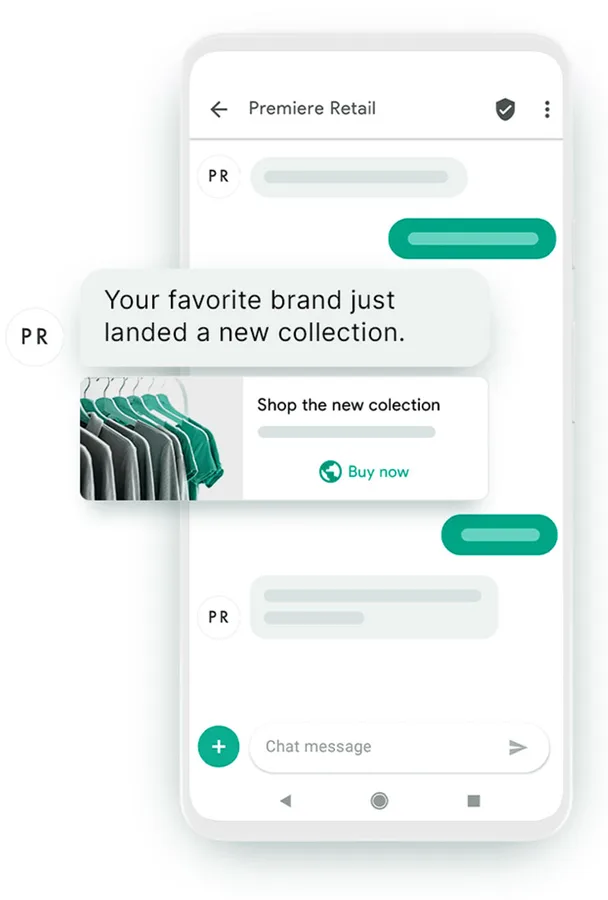
RCS in plain words.
SMS gives you 160 characters of text. RCS gives you a small mobile app inside the message thread. Customers see your name, scroll through photos and tap a button instead of typing a reply.
Richer content
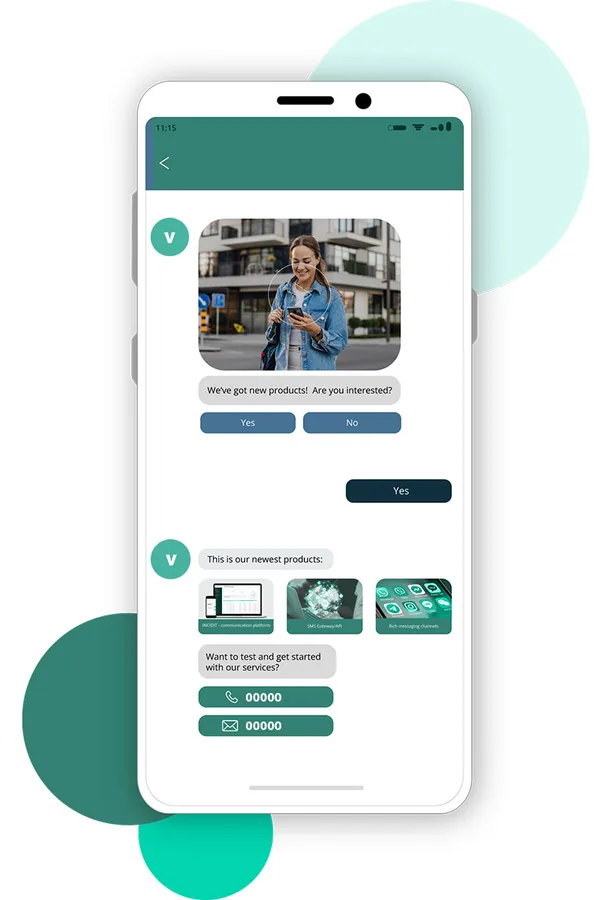
Images, video, audio clips and documents can sit inside the message, next to your text.
A known sender
Your registered business name and logo appear, so people can tell the message is really from you.
Two-way by design
Customers answer with taps or typed replies, and they can see read receipts and typing indicators.
No extra app
The message lands in the phone's default messaging app. Nothing to install or sign in to.
Links that open
Web links, call buttons and map or calendar actions are one tap away.
SMS fallback
When a handset cannot take RCS, the message can be delivered as SMS instead.
What changes for your messages.
RCS is not one feature. It is a set of things that work together, and each one solves a different problem you probably have with SMS today.
- Media. A product photo or a short clip explains more than two lines of text. Use it for offers, tickets and guides.
- Branding. Your logo, colours and a verified name sit at the top of the conversation. A carousel lets a shopper browse several items in one message.
- Engagement. Buttons turn a message into an action: check in, book, track an order or call you. Read receipts show you who has seen it.
What you get when you send RCS with us.
We run the registration, the template approvals and the sending platform, so your team only has to decide what to say.
- Brand registration and verification before launch.
- Template builder for rich cards, carousels and buttons, with a test stage before you go live.
- RCS Business Messaging API that connects to your support tools and CRM.
- Chatbot flows for routine questions such as order status or opening hours.
- Reports on delivered, read and clicked messages, and on button taps.
Pick the page that matches your goal.
We split the RCS topic across a few pages so you can go straight to the part you care about.
Campaigns
Offers, launches and reminders as interactive messages.
Read moreBrand identity
How a verified sender profile is set up and what it shows.
Read moreCustomer care
What your customer sees and how support works in the chat.
Read moreRCS or SMS
A straight comparison of reach, content, cost and branding.
Read moreFour steps to your first RCS message.
Share your use case
Tell us whether you want alerts, offers, support or all three, and roughly how many customers you reach.
Register your brand
We help you submit your business name, logo and details for verification.
Build and test templates
Create cards, carousels and buttons, send them for approval and try them on test phones.
Send and review
Launch from the dashboard or API, then read the delivery, read and click reports.
Questions about RCS.
What is RCS?
RCS stands for Rich Communication Services. It is a messaging standard built into the default messaging app on many Android phones. It lets a message carry images, videos, carousels and buttons, and it shows who sent it, which plain SMS cannot do.
Do my customers need to install an app?
No. RCS messages arrive in the phone's own messaging app, so there is nothing to download. The customer does need a device and messaging app that support RCS and a data or Wi-Fi connection.
What happens if a customer's phone does not support RCS?
The message can fall back to SMS, so the person still receives your text. Plan for this by keeping the key information, such as a code or a date, in the plain-text part of the message.
How do we send RCS messages through VNS?
You can send from the web dashboard or connect your application through our RCS API. Before the first send, your brand is registered and verified, and your message templates are submitted for approval.
Is RCS a replacement for SMS?
Not today. SMS reaches almost every phone, while RCS needs a compatible device and app. Most businesses use RCS where a richer message helps and keep SMS as the safety net. Our comparison page sets out the differences.
Keep reading
Want to see RCS on a real phone?
Tell us what you plan to send. We'll show you a sample message and explain the registration steps.